Hi everyone  ,
,
We were recently working with a local teacher and created a sample capstone-style project using an AIM robot and we wanted to share it with the community in case it is helpful for others.
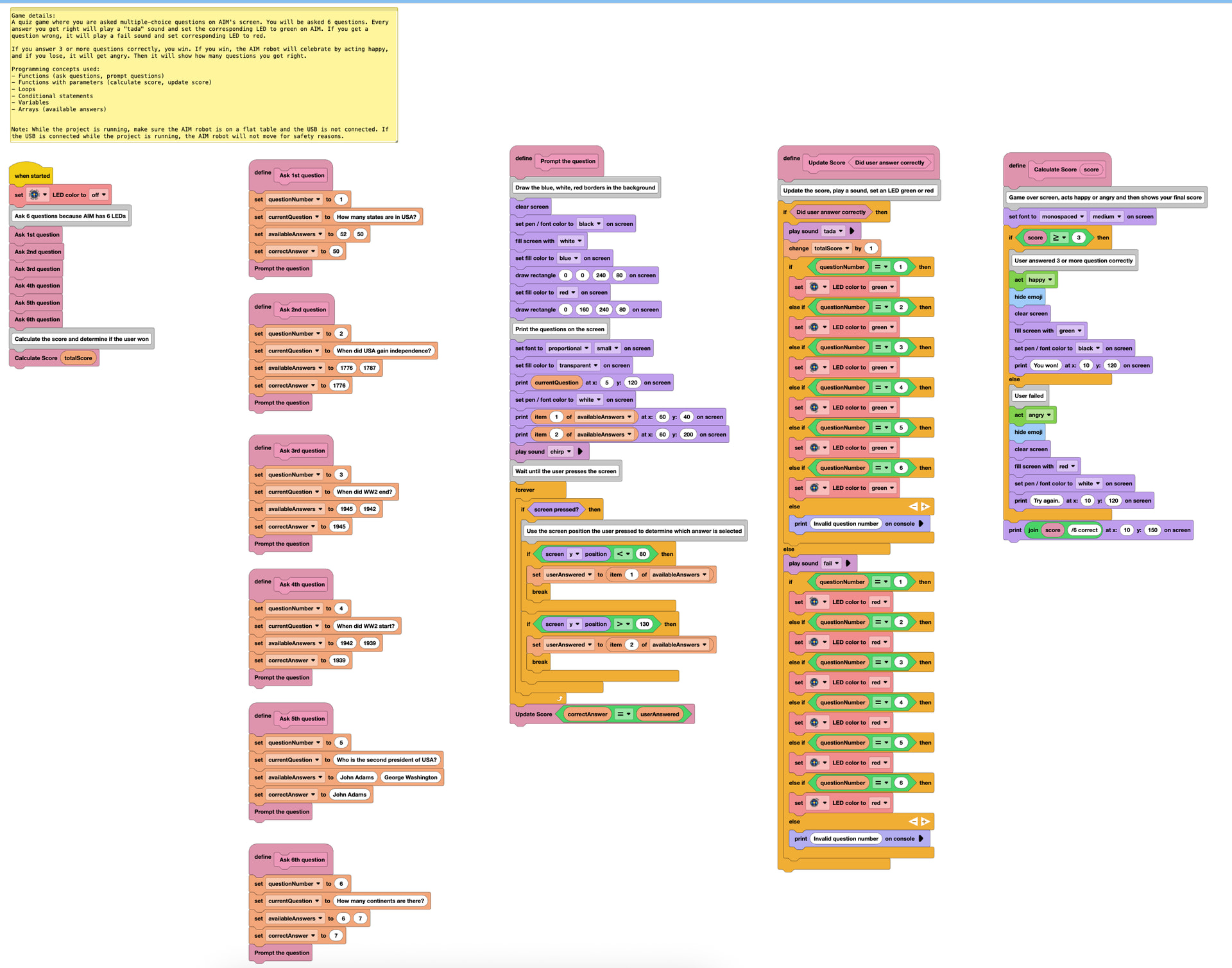
In this project, students play a quiz game on the AIM robot’s screen by answering 6 multiple-choice questions. For each correct answer, the robot plays a celebratory sound and turns the corresponding LED green. For each incorrect answer, it plays a fail sound and turns the LED red. At the end, the robot shows how many questions were answered correctly. If the student answers 3 or more questions correctly, the robot celebrates. Otherwise, it shows an angry reaction.
We designed this project to demonstrate several key programming concepts, including:
- Input: through the screen-based answer selection
- Output: through the screen, sound, LEDs, and robot movement
- Lists: to store and manage answer choices
- Procedures / My Blocks with parameters
- Iteration and selection within the program logic
Here is a screenshot of the project:
We thought this could be a fun and approachable way to bring programming concepts into the classroom while also giving students an engaging, game-based activity.
We’re sharing the project here in case it gives others ideas for how AIM can be used in their classrooms. If anyone has questions about how to adapt or incorporate something like this into their lessons, feel free to ask.
Video demonstrating the project: AIM Project Demo
Project File:
Capstone Project AIM.aimblocks (44.0 KB)